#!/usr/bin/perl -w

#this script search for frag on a fs
use strict;

#number of files
my $files = 0;
#number of fragment
my $fragments = 0;
#number of fragmented files
my $fragfiles = 0;

#search fs for all file
open (FILES, '-|', "find '$ARGV[0]' -xdev -type f -print0");

$/ = "\0";

while (defined (my $file = <FILES>)) {
        open (FRAG, "-|", "filefrag", $file);
        my $res = <FRAG>;
        if ($res =~ m/.*:\s+(\d+) extents? found/) {
                my $fragment = $1;
                $fragments += $fragment;
                if ($fragment > 1) {
                        $fragfiles++;
                }
                $files++;
        } else {
                print ("$res : not understand for $file.\n");
        }
        close (FRAG);
}
close (FILES);

print ( $fragfiles / $files * 100 . "% non contiguous files, " . $fragments / $files . " average fragments.\n");
Showing posts with label linux. Show all posts
Showing posts with label linux. Show all posts
Thursday, March 10, 2016
How to check disk fragmentation without using fsck
http://superuser.com/questions/474536/in-linux-how-do-you-check-if-a-disk-is-fragmented

Sunday, July 19, 2015
How to Install Telnet Server on CentOS/RHEL 6/5
http://tecadmin.net/install-telnet-server-on-centos-redhat/
Install Telnet Server
Telnet server is available under default yum repositories. Execute following command to install it
# yum install telnet-server
Enable Telnet Service
Telnet is an xinetd based service, First edit telnet xinetd configuration file /etc/xinetd.d/telnetand set disable to no.
service telnet
{
        flags           = REUSE
        socket_type     = stream
        wait            = no
        user            = root
        server          = /usr/sbin/in.telnetd
        log_on_failure  += USERID
        disable         = no
}
Now restart xinetd service
# service xinetd restart
Saturday, November 1, 2014
How to install JDK on Redhat/CentOS usng the alternatives command
http://www.if-not-true-then-false.com/2010/install-sun-oracle-java-jdk-jre-7-on-fedora-centos-red-hat-rhel/
Install Java JDK or JRE package
## JDK 32-bit ##
rpm -Uvh /path/to/binary/jdk-7u67-linux-i586.rpm

## JDK 64-bit ##
rpm -Uvh /path/to/binary/jdk-7u67-linux-x64.rpm

## JRE 32-bit ##
rpm -Uvh /path/to/binary/jre-7u67-linux-i586.rpm

## JRE 64-bit ##
rpm -Uvh /path/to/binary/jre-7u67-linux-x64.rpm
Install Sun/Oracle JDK java, javaws, libjavaplugin.so (for Firefox/Mozilla) and javac with alternatives –install command
## java ##
alternatives --install /usr/bin/java java /usr/java/latest/jre/bin/java 200000
## javaws ##
alternatives --install /usr/bin/javaws javaws /usr/java/latest/jre/bin/javaws 200000

## Java Browser (Mozilla) Plugin 32-bit ##
alternatives --install /usr/lib/mozilla/plugins/libjavaplugin.so libjavaplugin.so /usr/java/latest/jre/lib/i386/libnpjp2.so 200000

## Java Browser (Mozilla) Plugin 64-bit ##
alternatives --install /usr/lib64/mozilla/plugins/libjavaplugin.so libjavaplugin.so.x86_64 /usr/java/latest/jre/lib/amd64/libnpjp2.so 200000

## Install javac only if you installed JDK (Java Development Kit) package ##
alternatives --install /usr/bin/javac javac /usr/java/latest/bin/javac 200000
alternatives --install /usr/bin/jar jar /usr/java/latest/bin/jar 200000
Wednesday, July 30, 2014
How to upgrade Docker on Ubuntu 14.04 ?
http://askubuntu.com/questions/472412/how-do-i-upgrade-docker
http://xmodulo.com/2014/05/manage-linux-containers-docker-ubuntu.html
http://xmodulo.com/2014/05/docker-containers-centos-fedora.html
https://fredjean.net/running-docker-under-linux-mint-16/
http://xmodulo.com/2014/05/manage-linux-containers-docker-ubuntu.html
http://xmodulo.com/2014/05/docker-containers-centos-fedora.html
https://fredjean.net/running-docker-under-linux-mint-16/
Suppose it is Ubuntu Trusty (14.04) release, which has 0.9.1 officially
Update to 0.11.1 release
If you want to upgrade in this release, see new launchpad https://launchpad.net/~docker-maint/+archive/testing, better use ppa installation.
sudo add-apt-repository ppa:docker-maint/testing
sudo apt-get update
sudo apt-get install docker.io
Now I get the latest one
$ docker -v
Docker version 0.11.1, build fb99f99
Be aware, with the 1.0 GA release, this method may be changed
Update to latest release(now 1.1.1)
This is the way stated to install docker for 12.04 LTS in official document and noticed inubuntuupdates.org, which looks work for 14.04 as well.
Refer the command to Getting Docker Installed on Ubuntu 12.04 LTS as well
$ wget -qO- https://get.docker.io/gpg | sudo apt-key add -
$ sudo sh -c "echo deb http://get.docker.io/ubuntu docker main > /etc/apt/sources.list.d/docker.list"
$ sudo apt-get update
$ sudo apt-get install lxc-docker
Now I get
$ docker -v
Docker version 1.1.1, build bd609d2
lxc-docker will remove old docker package, therefore please backup the configuration in advance.Saturday, July 19, 2014
Install GNU command line tools on Mac OSX
http://www.topbug.net/blog/2013/04/14/install-and-use-gnu-command-line-tools-in-mac-os-x/
Install Homebrew
First, visit Homebrew homepage and follow the installation instructions to install Homebrew.
Shortcut: install the latest XCode and then run the following command to install:
ruby -e "$(curl -fsSL https://raw.github.com/Homebrew/homebrew/go/install)"
Then add the following line to your .bashrc or .zshrc:
export PATH="$(brew --prefix coreutils)/libexec/gnubin:/usr/local/bin:$PATH"
Install the GNU Command Line Tools
First comes the most important one – GNU Coreutils:
brew install coreutils
GNU Coreutils contains the most essential UNIX commands, such as ls, cat.
Thursday, April 10, 2014
AKKA 2.2.3 tutorial
http://www.reactive.io/tips/2014/03/28/getting-started-with-actor-based-programming-using-scala-and-akka/
http://roestenburg.agilesquad.com/2010/07/upgrading-to-akka-master-010-and-scala.html

http://saburi380.blogspot.com/2014/01/akka-223.html
It is the notes about how can you easily try on a single server, the Akka 2.2.3. ( Http://Akka.Io/ ) Akka 2.2.3 in CentOS6 on, + Java 7 a (OpenJDK) + scala 2.10. The multiple servers (three or
four) example is, here .

Friday, April 4, 2014
How to configure static IP on CentOS
https://gist.github.com/fernandoaleman/2172388
## Configure eth0 # # vi /etc/sysconfig/network-scripts/ifcfg-eth0 DEVICE="eth0" NM_CONTROLLED="yes" ONBOOT=yes HWADDR=A4:BA:DB:37:F1:04 TYPE=Ethernet BOOTPROTO=static NAME="System eth0" UUID=5fb06bd0-0bb0-7ffb-45f1-d6edd65f3e03 IPADDR=192.168.1.44 NETMASK=255.255.255.0 PREFIX=24 DNS1=208.67.222.222 DNS2=208.67.220.220 DNS3=208.67.222.220 HWADDR=00:24:7E:6D:C0:FB GATEWAY=192.168.1.1 ## Configure Default Gateway # # vi /etc/sysconfig/network NETWORKING=yes HOSTNAME=david-centos6 GATEWAY=192.168.1.1 ## Restart Network Interface # /etc/init.d/network restart ## Configure DNS Server # # vi /etc/resolv.conf nameserver 8.8.8.8 # Replace with your nameserver ip nameserver 192.168.1.1 # Replace with your nameserver ipNote: don't forget to modify /etc/hosts by adding a new entry for 192.168.1.44 and remove 127.0.0.1 (because 127.0.0.1 will result in Spark Master refuse the connection request from Spark Worker)
Saturday, January 5, 2013
Change cygwin home directory
http://codeaweso.me/2011/07/change-cygwin-home-directory/
mkpasswd -l -p "$(cygpath -H)" > /etc/passwd
|
Sunday, July 15, 2012
Shell tips
filename="all you need is love - the beatles.mp3"
ext=$(echo $filename | grep -o '\....$')
title=$(echo $filename | sed 's/ - .*//; s/\b\w/\u&/')
artist=$(echo $filename | sed "s/.* - \(.*\)$ext/\1/; s/\b\w/\u&/g")
echo $title - $artist$ext

All you need is love - The Beatles.mp3
Wednesday, April 4, 2012
How to install Groovy on ubuntu 10.10
http://www.code-republic.com/?p=12
note: Ubuntu uses /etc/environment to setup your environment variables
note: Ubuntu uses /etc/environment to setup your environment variables
Sunday, April 1, 2012
Saturday, March 31, 2012
Top Things to do after installing Ubuntu
http://www.unixmen.com/top-things-to-do-after-installing-ubuntu-1104-natty-narwhal/
Ubuntu 12.04 LTS Precise Pangolin beta 1 is almost out. The final release it scheduled to be out in the 26th of April 2012. After you actually get done with the installation, there would likely exist a heap of things you still need to take care of. This post will share some interesting insight and ideas about what you can and should do after a successful installation.
How to install OpenJDK 7 in Ubuntu 12.04 ?
http://www.ubuntugeek.com/how-to-install-oracle-java-7-in-ubuntu-12-04.html
Ubuntu 12.04 LTS Precise Pangolin beta 1 is almost out. The final release it scheduled to be out in the 26th of April 2012. After you actually get done with the installation, there would likely exist a heap of things you still need to take care of. This post will share some interesting insight and ideas about what you can and should do after a successful installation.
How to install OpenJDK 7 in Ubuntu 12.04 ?
http://www.ubuntugeek.com/how-to-install-oracle-java-7-in-ubuntu-12-04.html
Friday, March 30, 2012
Wednesday, March 28, 2012
Installing And Configuring ESXI 4.1 Free edition
http://www.youtube.com/watch?v=8Uh1mBsVGYo&feature=related
The movie clip shows you how to:
1. Install VMWare ESXi Free on VMWare Workstation
2. Install vSphere Client to manage/configure ESXi
A good introduction to the VMWare vSphere Hypervisor (type 1 and 2)
http://www.youtube.com/watch?v=HtNJD5cDpL8&feature=related
http://www.youtube.com/watch?v=ZBl1Tf2A4lA&feature=related
The movie clip shows you how to:
1. Install VMWare ESXi Free on VMWare Workstation
2. Install vSphere Client to manage/configure ESXi
A good introduction to the VMWare vSphere Hypervisor (type 1 and 2)
http://www.youtube.com/watch?v=HtNJD5cDpL8&feature=related
http://www.youtube.com/watch?v=ZBl1Tf2A4lA&feature=related
How to install new virtual machine (VM) to ESXi
FAQ
Thursday, March 22, 2012
Managing diskk usage with quotas
http://www.linuxhomenetworking.com/wiki/index.php/Quick_HOWTO_:_Ch28_:_Managing_Disk_Usage_with_Quotas
# who
# wall The system is shutting down now!
# init 1
# cat /etc/fstab | grep -w usrquota
(if not exist then add it to make it looks like below:)
# mount -o remount /home
# exit
# touch /home/aquota.user
# chmod 600 /home/aquota.user
# aquotacheck -vagum
# edquota -u mp3user
# who
# wall The system is shutting down now!
# init 1
# cat /etc/fstab | grep -w usrquota
(if not exist then add it to make it looks like below:)
LABEL=/home /home ext3 defaults,usrquota 1 2
# mount -o remount /home
# exit
# touch /home/aquota.user
# chmod 600 /home/aquota.user
# aquotacheck -vagum
# edquota -u mp3user
Disk quotas for user mp3user (uid 503):   Filesystem  blocks       soft       hard     inodes     soft     hard
/dev/hda3                                                 24          0          0          7        0        0


change the soft value to 5000 to limit user mp3user to a maximum of 5MB of data storage.
Sunday, July 31, 2011
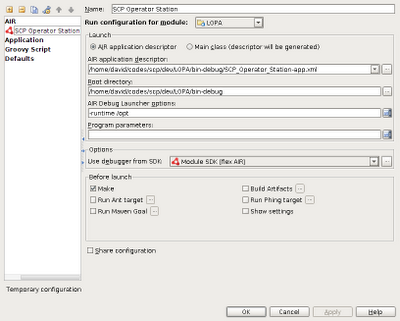
Configure LOPA to run on Ubuntu 10.10 (64-bit)
Install Flex SDK on Ubuntu 10.10 (64-bit):
http://www.philliphodges.co.uk/?p=435 (note: the adl in bin folder cannot be executed because the downloaded SDK is for Mac OSX not Linux, you need to download Linux version of AIR SDK from http://kb2.adobe.com/cps/853/cpsid_85304.html and copy the the Linux version adl over to /opt/flex/bin)
Install AIR SDK on Ubuntu 10.10 (64-bit):
Debug Configuration:

Friday, February 18, 2011
How to setup GitHub on Ubuntu 10.10 ?
The following keygen step is very important but not mentioned in the GitHub web sites ...
7. Generating SSH keys(Github needs it):
In the terminal type
>ssh-keygen -t rsa -C "xxxx@yzmail.com"Now execute the following commands :
ravi@Hackintosh:~$ cd .ssh ravi@Hackintosh:~/.ssh$ gedit id_rsa.pub Monday, February 14, 2011
Monday, February 7, 2011
How to prevents users from entering single user mode or changing settings at boot time ?
When your system is rebooted, grub presents the boot option menu. From this menu one can easily login into a single user mode without the password which might result into compromise system security.
For example, anyone can access the data or change the settings. However you can setup a password for grub with password option. This option forces grub to ask for a password before making any changes or entering into single user mode. You need to type p followed by password.
#1: Create A Password For Grub
Type grub-md5-crypt command to create password in MD5 format:# grub-md5-cryptOutput:
Password:
Retype password:
$1$NYoR71$Sgv6pxQ6LG4GXpfihIJyL0
Please note that you need to copy and paste the MD5 password ($1$NYoR71$Sgv6pxQ6LG4GXpfihIJyL0) to your configuration file. Use mouse to copy the same.
#2 Add MD5 Password To Grub Configuration File
Under Debian GNU/Linux the Grub configuration file is located at /boot/grub/menu.lst. (Red Hat / Fedora user use /boot/grub/grub.conf file)# vi /boot/grub/menu.lst
Edit file and add a password line as follows:password --md5 $1$NYoR71$Sgv6pxQ6LG4GXpfihIJyL0
Here is my sample config file:
default         0
timeout         5
password --md5 $1$NYoR71$Sgv6pxQ6LG4GXpfihIJyL0
title           Debian GNU/Linux, kernel 2.6.13.4-cust-en-smp
root           (hd0,0)
kernel        /boot/vmlinuz root=/dev/hda3 ro
savedefault
boot
Save and close the file.
http://www.cyberciti.biz/tips/how-do-i-secure-grub-boot-loader.html
Subscribe to:
Posts (Atom)